
Hopper: Hotels, Flights & Cars
Hopper Inc.Travel & Local
4.528.95K Reviews
- Version
- 5.116.0
- Installs
- 10.00M
- Age Rating
- Everyone
Screenshots




Our Review of Hopper: Hotels, Flights & Cars
 Analysis by Appyee
When I plan a trip for more than one person, the hardest part is often not finding a flight or hotel. It is keeping everyone aligned while prices, dates, preferences, and payment decisions move around. I used Hopper: Hotels, Flights & Cars as a travel companion for that kind of planning, and I found it most useful when treated as a shared research tool rather than a complete replacement for careful booking decisions.
The app comes from Hopper Inc. and sits in the Travel & Local category. It is free to install, carries an Everyone age rating, and has become a widely used option, with more than ten million installs and an average rating of 4.5 from roughly one hundred fifty thousand ratings. Those figures suggest a mature travel app, but they do not remove the need to read the final booking details closely. Travel purchases are too important to make on a glance at a colorful prediction or a low starting price.
How Hopper Works When a Household Plans Together
My favorite use case is a household arranging a trip where one person researches and another person has the final say. For example, imagine two adults planning a long weekend with a teenager. One adult can compare flight dates and hotel areas during a lunch break, while the other checks work commitments, luggage needs, and the total budget later. Hopper is helpful in that early stage because it gives the conversation a concrete starting point instead of leaving everyone to exchange scattered screenshots from different travel sites.
That shared-device scenario also reveals an important boundary: the app is not a family organizer. It is a travel booking app, so I would not use it as the single place to manage a household itinerary, assign tasks, or record every traveler’s personal requirements. I would use it to investigate options, save the most promising choices in my own account, and then confirm the details with everyone before paying.
This distinction matters when several people use the same phone or tablet. A search made for one traveler can easily be mistaken for a decision made for the whole group. I recommend saying out loud whether a screen shows a rough search, a watched option, or a reservation that has actually been purchased. That simple habit prevents the most common shared-device misunderstanding: someone assumes the trip is booked when another person was only comparing possibilities.
Starting a Search Without Losing the Real Trip Requirements
Hopper covers flights, hotels, and cars, which makes it convenient when a trip needs more than one reservation type. I usually begin with the least flexible part of the journey. If the dates are fixed because of school or work, I search the flight first. If the destination is flexible, I spend more time comparing dates and then look for accommodation in the areas that make sense for the actual activities.
For a household, the search should begin with facts that affect everyone: number of travelers, baggage expectations, room arrangement, pickup and return needs, and whether anyone has mobility or location constraints. A low-looking result can stop being attractive once a larger room, extra luggage, or a practical car size is required. Hopper helps surface options, but it cannot decide which compromise is acceptable for your family.
I also avoid searching while casually logged into another person’s account. On a shared device, account boundaries are more important than they first appear. A traveler may want to watch a fare without being the person who pays, while another household member may expect to receive booking information. Before entering personal or payment details, I check whose account is active and who will be responsible for the reservation.
Account Boundaries and the Handoff Before Payment
The cleanest workflow I found is to separate discovery from commitment. I use the app to explore dates, routes, hotels, and car categories. Once I have a realistic shortlist, I send the essential details to the other decision-maker in a message or discuss them directly. Only after everyone agrees do I return to the app for the final review.
This is especially useful when a child or teenager is helping with research. They can compare destinations or look at hotel locations with an adult, but I would keep account access, payment information, and the final purchase with the responsible adult. The Everyone age rating makes the app broadly accessible, yet an age rating is not the same thing as permission to make travel purchases. A young user can understand a search without being ready to accept cancellation rules or payment obligations.
I would also avoid leaving a payment screen open on a shared device. Even when the household trusts one another, people can tap through a screen assuming it is still a comparison page. A better routine is to close the app or return to a neutral screen after research, then reopen the relevant trip only when the person making the purchase is present.
Another useful boundary is keeping the traveler list consistent. If one person searches for two adults and another later assumes the result includes a child, the displayed price and room suitability may no longer match. I treat every change in passenger or guest details as a new check, not a minor edit. That habit is more valuable than trying to remember which result belonged to which version of the trip.
Using Price-Watching Ideas Without Treating Them as Promises
One of Hopper’s strongest ideas is helping travelers think about timing instead of forcing an immediate decision. I like that approach when my dates have some flexibility. It encourages me to compare nearby travel days and consider whether waiting is sensible, rather than choosing the first acceptable fare simply because I am tired of searching.
Still, I would not treat any prediction or recommendation as a guarantee. A household trip has a different risk tolerance from a solo weekend. If missing a preferred flight would create childcare problems, lost work time, or a difficult hotel change, a slightly higher price may be worth the certainty of booking now. The app can support that judgment, but it cannot know the emotional and practical cost of a disrupted plan.
My practical tip is to define the family’s stop point before watching prices. For instance, decide which dates, arrival times, and total budget are acceptable. Then use Hopper to look for a match within those boundaries. Without that rule, price watching can become an endless loop in which everyone keeps hoping for a better result while the trip remains unsettled.
I also compare the full trip cost rather than focusing on a single attractive number. A flight arriving far from the hotel may require a car or expensive transfer. A cheaper hotel may add time and transport costs every day. A car option may look suitable until the luggage and passenger count are considered. Hopper is most useful when I use it to assemble the whole picture, not when I judge each item in isolation.
Coordinating Flights, Hotels, and Cars in One Conversation
Combining several travel categories is convenient, but it can also create false confidence. A flight, hotel, and car may each look reasonable separately while producing an awkward overall schedule. I check arrival and departure times against hotel check-in, car pickup hours, and the actual purpose of the trip. If the household lands late, a distant hotel may be a poor choice even if the room price looks attractive.
For a shared trip, I write down a short decision summary before booking: travel dates, airports, room type, car size, arrival time, and who is paying. That summary gives the second adult something concrete to approve. It also helps when one person is researching on a phone and another is reviewing the plan on a different device. The app supports the search, but the household still needs its own plain-language record.
Cars deserve particular care because the category can hide practical differences. I would check whether the vehicle is large enough for the group and luggage, whether the pickup location is convenient, and which conditions apply to the reservation. I would not choose a car solely because it is the cheapest result. A cramped vehicle can turn an otherwise manageable family journey into a daily source of frustration.
Hotels require the same discipline. I look beyond the property name and ask whether the location fits the group’s routine. A household with a young traveler may value a short walk to meals and attractions more than a lower nightly price outside the main area. A group with an early flight may prefer airport convenience. The app can help compare lodging, but only the travelers know whether the location will make mornings easier or harder.
What I Check Before Calling a Trip Booked
My final review is deliberately slow. I check names, dates, airports, room occupancy, pickup details, and the total amount shown at checkout. I also read the cancellation and change conditions instead of assuming that every travel product follows the same rules. Flights, hotels, and car reservations can have different restrictions, and a household needs to know which part of the plan is least forgiving.
This is where Hopper feels less magical and more like a normal booking tool. The app can make discovery feel simple, but the responsibility returns to the traveler at the point of commitment. I would not let a child tap through the final screens, and I would not ask a distracted adult to approve a booking while someone else summarizes the details verbally. Everyone involved should see the same final information.
If a trip is being booked for another person, I confirm who will receive the reservation information and who can handle a change later. This is a small coordination detail, but it matters in households where one adult arranges travel and another adult is the actual traveler. A booking can be correct while still being inconvenient if the wrong person has to search for the confirmation or explain the reservation at check-in.
Age, Trust, and Everyday Shared-Device Use
Because the app is rated for Everyone, it can reasonably be present on a family device used for travel research. I see that as an accessibility advantage, not as a signal that every travel action should be open to every household member. The right approach is guided participation: younger users can help compare destinations, inspect hotel surroundings, or discuss which flight time feels manageable, while adults control personal data and purchases.
That arrangement also teaches a useful travel skill. Children can learn that a displayed fare is not automatically the final cost, that a hotel’s location affects the day, and that a reservation has rules attached to it. Hopper gives a practical setting for those conversations because its focus is real travel rather than abstract budgeting. I would still explain every decision in simple terms and avoid presenting a prediction as a promise.
Trust should be matched with clear roles. One person can be the researcher, another the approver, and a third perhaps the traveler who needs the itinerary. Those roles do not require special family controls inside the app; they require agreement outside it. If a household cannot agree on who is allowed to book, I would postpone the purchase rather than rely on the shared device to prevent mistakes.
For older relatives or less confident travelers, I found that the app is best used alongside a patient explanation. A family member can help compare the options, then review the final details in larger, plain language. The app may reduce the number of places needed for research, but it does not replace the human step of explaining airport changes, hotel location, or car pickup expectations.
Where Hopper Beats Familiar Alternatives
Compared with searching directly across separate airline, hotel, and rental-car websites, Hopper is more comfortable during the discovery phase. Its travel focus keeps the planning conversation in one app, and its approach to watching prices can be more useful than repeatedly checking the same route without a plan. For someone who is still deciding when to travel, that can reduce the feeling of starting over each time.
Compared with a traditional travel agent, the app gives me more immediate control and makes casual comparison easier. I can investigate options at my own pace and involve another household member before committing. The trade-off is that I am responsible for noticing the fine print, checking whether the itinerary works as a whole, and handling the consequences of a poor choice.
Compared with booking directly with an airline or hotel, an intermediary app may not always be my first choice when I already know exactly what I want. Direct booking can feel clearer for managing an existing loyalty relationship, contacting the provider, or making a complicated change. If the trip involves unusual passenger needs, several linked reservations, or a high chance of changing plans, I would compare the direct option carefully before paying through an app.
That does not make Hopper weak. It simply gives the app a specific role in my travel toolkit. I see it as particularly good for flexible planning, price-conscious comparison, and households that need a shared starting point. I see direct provider booking as potentially better when the itinerary is simple, fixed, and sensitive to support or change handling.
Limitations I Noticed in Real Planning
The biggest limitation is psychological: an attractive result can make people stop asking practical questions. In a group, that effect is stronger because one person may announce that they found a deal before the others have checked baggage, room space, arrival time, or cancellation terms. The app can speed up discovery, but it can also speed up premature agreement.
Another friction point is coordination across accounts and devices. A family may share the research but not the same login, email, or payment method. That is not a problem unique to Hopper, but it means the app should not be treated as the household’s only communication channel. I still keep a separate note with the agreed dates and traveler details, especially for trips involving multiple reservations.
I am also cautious when flexibility is low. If the household must travel on one exact day, needs a particular room arrangement, or cannot tolerate a complicated change, the app’s discovery advantages matter less than certainty. In those cases, I spend more time verifying the provider’s terms and considering whether booking directly would make support simpler.
Finally, free access does not mean the planning process has no cost. The real cost is attention. Comparing too many combinations can exhaust the group and make a reasonable choice feel inadequate. I get better results when I limit the search to a few acceptable options, agree on the deciding factors, and stop once one option clearly meets them.
My Household Verdict
After using it as a planning aid, I would recommend Hopper to households that want an approachable way to compare flights, hotels, and cars while discussing a trip together. It is especially useful when dates can move, when one person researches and another approves, or when the group needs help turning a vague travel idea into a shortlist.
I would not recommend handing the app to a child as an unsupervised booking tool, and I would not rely on it alone for a complicated itinerary. The Everyone rating makes it suitable for shared family research, but adults should establish account, payment, and approval boundaries themselves. That small amount of structure makes the experience safer and much less confusing.
Hopper is free, and its current version is 5.111.1 for devices running operating system version 10 or later. It was released on August 30, 2015, and the long-running product has the scale I expect from an established travel app. What matters more to me, though, is using that maturity sensibly: let it help with discovery and timing, then slow down for the decisions that affect the whole household.
My final view is positive but measured. I would install Hopper: Hotels, Flights & Cars for the first stages of a family trip, particularly when we are balancing dates and comparing several types of booking. I would keep a separate shared note, review every final condition, and choose another route when direct provider support or unusual travel requirements matter more than convenience. The best result comes from combining Hopper’s comparison tools with clear human agreement.
Privacy and Permissions
See what permissions an app requests and how it handles your data.
- Contacts
- read your contacts
- Location
- approximate location (network-based)
- Phone
- read phone status and identity
- Photos/Media/Files
- read the contents of your USB storage
- Storage
- read the contents of your USB storage
- Camera
- take pictures and videos
- Microphone
- record audio
- Device ID & call information
- read phone status and identity
- Other
- view network connections, control flashlight, full network access, change your audio settings, run at startup, control vibration, prevent device from sleeping, read Google service configuration
Verdict
Strengths of Hopper: Hotels, Flights & Cars
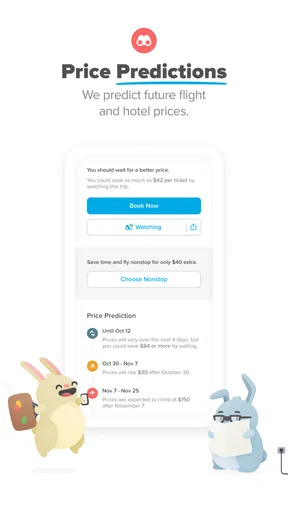
- Price alerts help track fare changes and potential savings.
- Includes hotels, flights, and car rentals in one app.
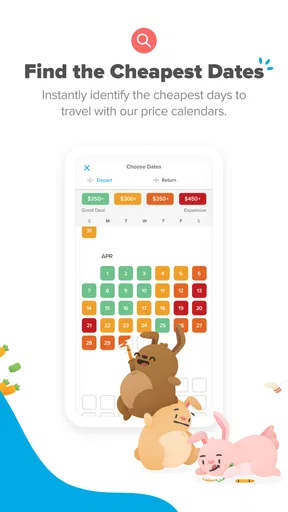
- Flexible date tools make it easier to compare travel options.
- Booking details and trip information are organized in one place.
- Useful destination suggestions can inspire future travel plans.
Limitations of Hopper: Hotels, Flights & Cars
- Some deals may include restrictions or nonrefundable booking terms.
- Prices can change before checkout because availability updates quickly.
- Customer support quality may vary depending on the travel provider.
- The app may request notifications that feel excessive for some users.
- Certain bookings may involve third-party policies and additional fees.
Similar Picks in This Category
View All
Google Maps
Google LLC3.4

Google Maps Go
Google LLC4.1

Booking.com: Hotels & Travel
Booking.com Hotels & Vacation Rentals4.8

Google Earth
Google LLC3.8

Skyscanner Flights Hotels Cars
Skyscanner Ltd4.8

trivago: Compare hotel prices
trivago N.V.4.4
Frequently Asked Questions
What is Hopper: Hotels, Flights & Cars used for?
Hopper is a travel-booking app designed to help users search and reserve flights, hotels, and car rentals from a mobile device. It also provides price predictions, deal alerts, and flexible booking options in some markets. The app is especially useful for travelers who want to compare prices and monitor changes before deciding when to book.
Can Hopper really predict when flight or hotel prices will drop?
Hopper uses historical pricing data and its own forecasting tools to estimate whether prices for selected flights or accommodations may rise or fall. These predictions can be helpful when planning a trip, but they are not guarantees. Travel prices can change unexpectedly because of demand, availability, airline policies, seasonal events, and other factors outside Hopper’s control.
Does Hopper offer flexible cancellation or refund options?
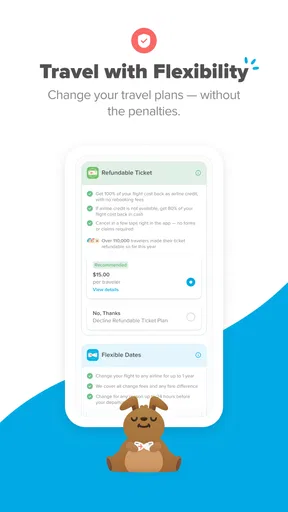
Hopper may offer products such as flexible cancellation, price protection, or booking guarantees, depending on the reservation, destination, provider, and local availability. These options can involve an additional fee and usually include specific terms and deadlines. Before paying, carefully review the cancellation conditions, refund method, exclusions, and whether the policy comes from Hopper or the travel supplier.
Are Hopper prices the final amount I will pay?
The price shown during the initial search may not always represent the complete final cost. Taxes, resort fees, baggage charges, seat selection, insurance, service fees, rental-car deposits, and other extras may be added during checkout or charged by the provider. Always continue to the final payment screen and read the complete price breakdown before confirming a booking.
Is Hopper safe for booking flights, hotels, and rental cars?
Hopper is a legitimate travel-booking platform, but it acts as an intermediary between customers and airlines, hotels, and car-rental companies. This means changes, cancellations, delays, and support requests may sometimes require communication with both Hopper and the provider. Use the official app, verify traveler details carefully, save confirmation emails, and review the supplier’s policies before completing your purchase.
